I Built a Business Model Canvas App for Mac. Here's Why.
The most-used strategy framework in the world runs on sticky notes and Google Docs. I built a native Mac app to fix that.

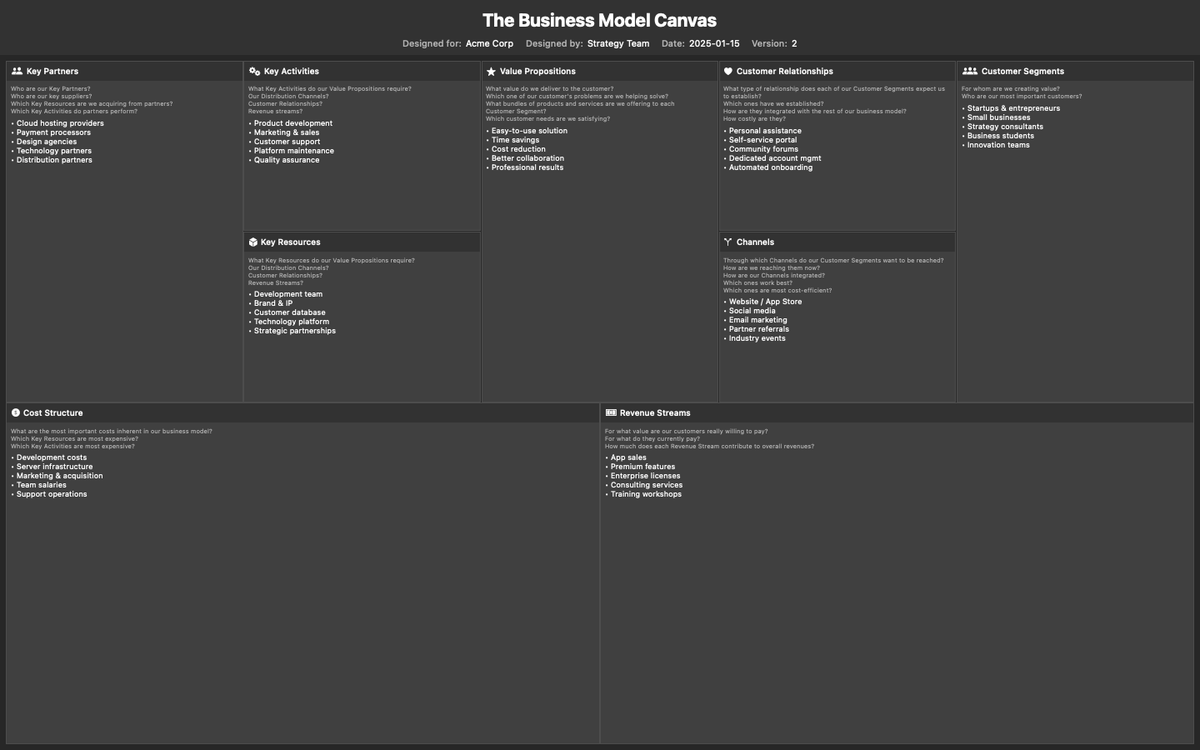
The Business Model Canvas has been downloaded over 5 million times. Stanford, Harvard, and IESE teach it in their MBA programs. GE, P&G, and Nestlé use it to manage strategy. It's arguably the most widely adopted strategy framework in the world.
And most people fill it out with sticky notes.
Or worse: a shared Google Doc with nine poorly aligned text boxes. I've sat in enough workshops to know how that ends. Someone accidentally deletes the Revenue Streams column. The formatting breaks. Someone's cursor is blinking in your section.
I wanted something better. So I built it.
What the App Does
Business Model Canvas Editor is a native macOS app. No browser. No account. No subscription. You open it, and there's your canvas.
All nine building blocks of Osterwalder's framework are laid out in the correct grid: Key Partners, Key Activities, Key Resources, Value Propositions, Customer Relationships, Channels, Customer Segments, Cost Structure, and Revenue Streams.
Each section includes built-in guide questions. The same prompts from the original methodology. "What value do we deliver to the customer?" "For whom are we creating value?" Toggle them on when you're brainstorming. Turn them off when you need a clean view.
Features That Matter
Light and dark mode. Because strategy sessions happen at midnight too. Export to PNG or JPEG. Up to 5K resolution, with configurable text sizing. Drop it straight into a pitch deck, a board presentation, or a Notion page. Save and load `.bmc` files. A simple, portable format. Version your canvas alongside your code. Share it with collaborators. Drag and drop to open. Clipboard paste. Copy a canvas from another source and paste it directly into the app. Custom logo. Add your company logo for branded exports. Header fields. Track who designed the canvas, when, and which version you're on. Simple metadata that becomes critical when you're iterating fast.
Why Native?
Web apps have their place. But for a focused creative tool, native wins.
The app launches instantly. It works offline. It respects your system appearance. It doesn't need a server. Your data stays on your machine. No telemetry. No analytics. No tracking.
I built this with SwiftUI on macOS 15. It's fast, lightweight, and feels like it belongs on your Mac. Because it does.
Who It's For
Startup founders mapping their first business model. You need to iterate quickly. This tool lets you save versions, export snapshots, and keep moving. Strategy consultants running workshops. Export high-resolution images of completed canvases. No more photographing whiteboards. Business students learning the framework. The built-in guide questions teach the methodology as you use it. Innovation teams inside larger companies. Save your canvases as files. Drop them in shared drives. No account management.
The Honest Pitch
This isn't a collaboration platform. It's not Miro. It's not trying to be.
It's a focused, single-purpose tool for people who actually use the Business Model Canvas and want something better than a PDF template. You open it. You think. You write. You export.
If that's what you need, it's on the Mac App Store now.
Sources
- Strategyzer: Why and How Organizations Apply the Business Model Canvas - Global adoption data showing 5M+ downloads, used by GE, P&G, Nestle and top business schools
- Interaction Design Foundation: Business Model Canvas - Overview of the Business Model Canvas framework and its global adoption