Introducing Audio Auto Sampler

If you’ve ever spent an afternoon sampling a synth, drum machine, or modular setup, you know the drill.
Hit record. Play a sound. Stop. Trim. Rename. Repeat.
Over and over again.
Audio Auto Sampler was built to remove that friction.
The problem with manual sampling
Most sampling workflows are still surprisingly manual. Even in a modern DAW, capturing clean one-shots or phrases often means recording long takes and editing them down afterward. It breaks focus and turns a creative session into file management.
When you’re sampling hardware instruments, sound effects, or voice, what you usually want is simple:
Play a sound, get a file.
How Audio Auto Sampler works
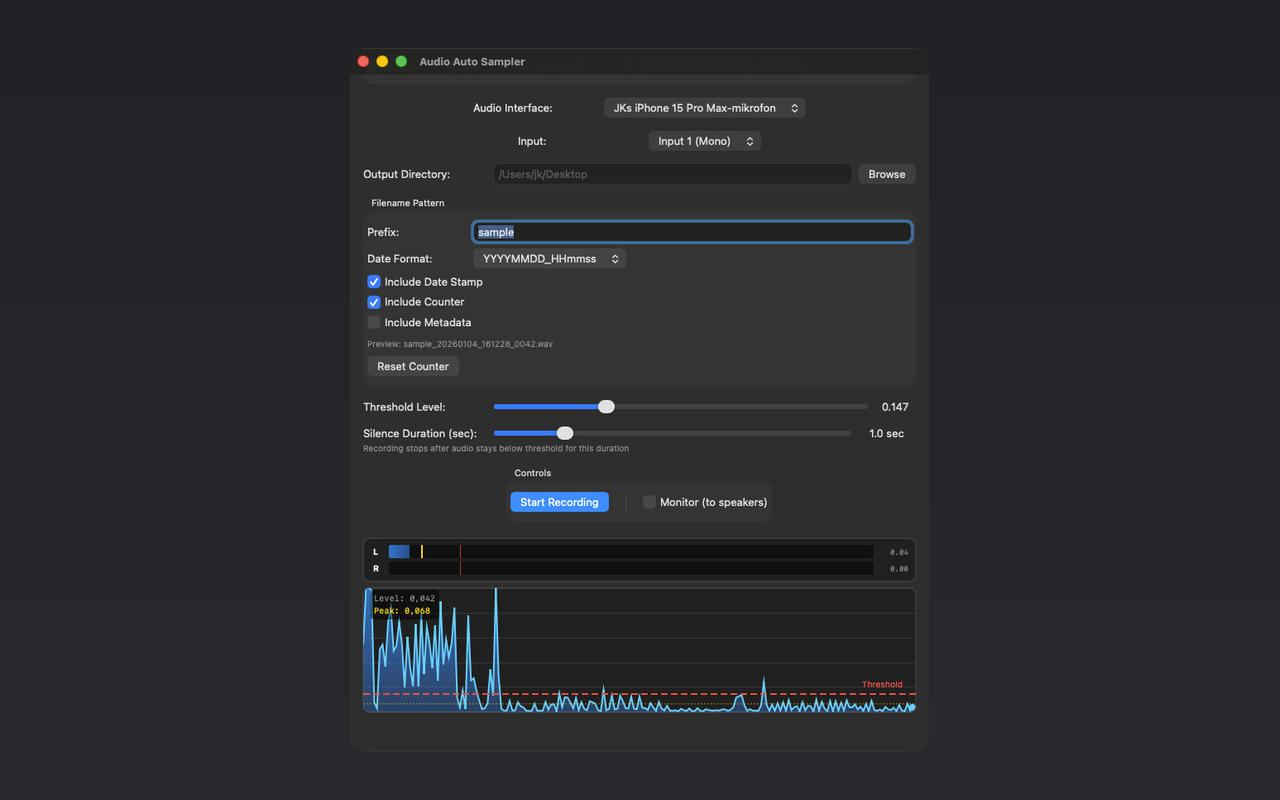
Audio Auto Sampler listens to your audio input and records automatically when sound is detected.
You set:
- An input device and channel
- A threshold level
- How long silence should last before a recording ends
When the signal crosses the threshold, recording starts.
When it stays quiet for the defined time, the file is saved and the app immediately waits for the next sound.
Each take becomes a clean, trimmed WAV file. No manual start and stop. No editing afterward.
Designed for real workflows
The app is intentionally simple. It’s meant to sit in the background and do one thing well.
Typical use cases include:
- Sampling hardware synths and drum machines
- Recording drum hits and one-shots
- Capturing sound effects and foley
- Recording voice, dialogue, or spoken phrases
- Any situation where repeated recording becomes tedious
Files are saved locally to any folder you choose, with customizable filenames including timestamps, counters, and metadata if you want it.
No cloud, no subscriptions
Audio Auto Sampler does not use accounts, subscriptions, or cloud services.
All audio stays on your machine.
It’s a utility, not a platform.
Built for focus
The goal was to create a tool that disappears once it’s set up. You press record once, then focus entirely on sound. The app takes care of the rest.
If sampling is a regular part of your workflow, Audio Auto Sampler is designed to make that process faster, cleaner, and less intrusive.
Press record once. Everything else is automatic.